October 19, 2019

Burmese Keyboard on Cell Phone

I. Unicode for iPhone

Settings > General > Keyboard > Keyboards > Add New Keyboard... > Burmese

II. Burmese keyboard Gboard Android

1. Download the Gboard
2. Open and follow the steps
3. Add a language, find "Burmese" (it's Unicode)
4. Check on both keyboards (keyboard & handwriting) if you prefer to


 KR,

bamalearnburmese@gmail.com • instagram.com/bama_burmese/


March 04, 2019

Newborn essentials checklist to buy, baby stores in Jakarta

Hello!

Newborn

Registering the birth of a child in Indonesia and apply for affidavit & passport 

Clothes

  1. Long and short set - Velvet junior set new born, bamboo and non bamboo, each 4 sets. The non bamboo ones are pretty thick. The bamboo ones are thin. Preferably buttons at the front.
  2. Long and short - Fluffy set new born, each 4 sets. Thin.
  3. Mittens. At first, only bought 4 sets, we kept buying until 10+ sets, since she kept making it wet by putting them in her mouth. We stopped putting mittens on her when she was 4 months, when she stopped scratching her face.
  4. Swaddle Velvet junior 10 pcs.
  5. Alas ompol Oz 12 pcs.
  6. LEN mattress protector 1 pcs, KLÄMMIG Changing pad 3 pcs from IKEA.
  7. Silky soft dream blanket pebble shibori Aden Anais 1 pcs. She didn't like blanket ever since newborn. She would kick the blanket 'till it's gone then she sleeps.
  8. Hats 2 pcs. Didn't use it.
  9. Washcloth (heart breaker) Aden Anais 3 pcs.
  10. Next Bibs 6 pcs.
  11. Bandana bib Honey Bunny 2 pcs.
  12. Burp cloth 4 pcs. Bought many more when she was 4 months old, that she started drooling.

Diapers, lotions, bottles and more

  1. Nepia Genki Tape Newborn.
  2. Breast Pads Honeycomb Pigeon.
  3. Cotton ball small Mothercare.
  4. Baby tissue Paseo.
  5. Small glass tupperware for cottons & warm water (when changing diaper).
  1. Buds Organics precious newborn head to toe cleanser.
  2. Precious newborn cream Buds Organic. 
  3. Baby massage oil Buds Organic. How to massage : Johnsons  Baby Center
  4. Bum rush Sudocrem.
  5. Protopic ointment 0.03% for her eczema. We tried several brands, the ones with steroid usually work; no more rash within 2 days. Protopic does not contain steroid, also works well.
  6. Newborn eye shield.
  1. Night time pacifier 0-6m Pigeon 2 pcs.
  2. Chu Chu Standard PPSU bottle 150 ml 3 pcs.
  3. Chu Chu bottle 240 ml 2 pcs.
  4. Nylon bottle brush Pigeon.
  5. Sterilization Tongs Pigeon.
  6. Thermos 500 ml.
  7. Safety pins large.
  8. Baby cotton swap.
  9. Kasa hidrofil steril = to clean tongue, dip in boiled water, and air until cooled, then clean baby's tongue.
  10. Dr Brown's Tooth & Gum.
  11. Softmate Basic Tissue.
  12. Baby detergent Pigeon.
  13. Bottle liquid cleanser Pigeon.
  1. Mooimom bra.
  2. Mamaway corset. Even after 3 years, sometimes stomach hurts if carry heavy things, wear it a couple hours.
  3. We don't use baby bed and pillow, just put folded swaddle under the head. Put our pillows by her sides.
  4. Baby mosquito net (baby size).

Equipment

  1. Travel bed Nuna Sena Aire Frost with insect net, mattress protector & bed sheet. Bought, but never used. Baby sleeps with mom.
  2. Diaper bag IKEA (too small though: the thermos, 1 water bottle, 1 pacifier, 5 sachets meiji cube, 3 bottles, 2 swaddle, 1 waterproof diaper pad, 1 set of shirt and pants, 5 diapers, 2 bibs, small baby paseo, several pieces softmate basic tissue).
  3. Playmat Dwinguler.
  4. Bath tub XL & gayung Puku.
  5. Pigeon Nail Scissor (New Born Baby) = use it since newborn until now 3 years old.
  6. Termoscan 7 ear thermometer Braun.
  7. Stérimar nasal hygiene. 
  8. We bought several Nasal Aspirator, none of them work. Better manually suck.
  9. Stroller Bugaboo Bee5.
  10. Carseat CabrioFix Maxi-Cosi. Never use.
  11. Rainbow 2 baby carrier I-angel. Barely use.

Milk & Food

  1. Back in Jakarta we gave her MEIJI Hohoemi Baby Milk powder.
  2. We started giving her solid when she was 4+ months old. We tried various brands of puree and other types of food. She doesn't really like the 'western' brand pouches and glass jars: Earth Best, Gerber, Heinz; maybe because they are usually sour. She really loves Kewpie in glass jars (we tried many flavors, she likes all). 
  3. US Baby Silicone Heat Sensing Spoon. We do not use food dispensing/feeding spoon. 
  4. We bought Nuby food masher and Farlin food maker but never use.
  5. Nuby Trainer Cup. Never use. She drinks right from normal cup.

Clothing Brands & Stores

  • Chubby Baby
  • Aden Anais
  • Ardenleon 
  • Baby Dior
  • Baby Giggle
  • Birds & Bees
  • Bohopanna
  • Boogybaby 
  • Carter's
  • Fluffy
  • GAP
  • GingerSnaps
  • Gymboree
  • Happpylittlepop (ig)
  • H&M
  • Janie and Jack
  • Jummakids (ig)
  • Kazel
  • Kenzo
  • Kiddokiddi_kidswear (ig)
  • Libby
  • Little Palmerhaus 
  • Little_bathi (ig)
  • Mini Cottons
  • Mothercare
  • Next baby
  • Petite Mimi (legging)
  • Sabine and Heem
  • Source_id (ig)
  • Tofftop8 (ig)
  • Velvet Junior
  • Zara
  • Ziel Kids

Mobile Apps

  1. theAsianparent. Good reading on milestones.
  2. BabyCenter. Also to track growth.
  3. WebMD & WebMD Baby.
  4. Chai's Play.
  5. Baby Tracker. Track feeding, sleep, diaper change, pumping, others. Never use it though. I track them on my notebook: 
  6. sleep time - wake time. time of drink & how much, diaper change, poo, vitamin, cut nails,
    SUM drink and sleep each end of day (+- 6 am until 6 am next day). Doctor might ask these when we visit.

2 years old

  • Khan Academy Kids
  • Lingo Kids
  • Endless Alphabet
  • Epic!
Youtube
  • Cocomelon
  • Little Fox
  • Super Jojo
(All have other languages)

KR,

Pigeon Nail Scissor (New Born Baby) Made in Japan


July 29, 2014

How to Get Pinyin out of Chinese Char & Write Pinyin Tone Mark on Mac

My OS X 10.9.4 (13E28).

Here are 2 different items I am going to cover:
I. How to show the pinyin out of your chinese character (automatic by mac).
II. How to get your pinyin tone when you are typing pinyin.


I. How to show the pinyin out of your chinese character

1. Example: we are in Mac Keynote
2. Choose your Keyboard > Input Sources is Pinyin
choose keyboard

3. Type the chinese character
Type the chinese character

4. Block the words you want to get pinyin. Go to Format > Phonetic Guide Text
Phonetic Guide Text

5. Choose the pinyin
Choose the pinyin

Now you have pinyin on top of your Chinese character
pinyin on top of your Chinese character


II. How to get your pinyin tone when you are typing pinyin

1. System Preferences > Keyboard > Input Sources > + > English > [right pane] U.S. Extended > Add

Add input sources keyboard mac

2. Choosing keyboard from menu bar

Choose keyboard

3. How to create the pinyin tone

First tone: Press option + a and then a, e, i, o, u, or v to create ā, ē, ī, ō, ū, or ǖ.
Second tone: Press option + e and then a, e, i, o, u, or v to create á, é, í, ó, ú, or ǘ.
Third tone: Press option + v and then a, e, i, o, u, or v to create ǎ, ě, ǐ, ǒ, ǔ, or ǚ.
Fourth tone: Press option + ` and then a, e, i, o, u, or v to create à, è, ì, ò, ù, or ǜ.
The vowel ü with no tone: Press option + u and then u to create ü.

Source

More Mac Keyboard shortcut
Mac
Forlang

KR,

July 21, 2014

Typing Complex Burmese Script on Mac with UNICODE

Halo,

Please notice the terms: encoding, font and keyboard. UNICODE is an encoding, Myanmar Census is a font. I will use UNICODE fonts just to simplify the story.

Contents:
  1. Preface
  2. Getting UNICODE Burmese font and keyboard on Mac OS X.
  3. Typing complex UNICODE Burmese script.
  4. UNICODE Burmese keyboard map on Mac OS X.


1) Preface
  1. There are 2 well-known Burmese fonts / encodings: Zawgyi and UNICODE. Locals used to use Zawgyi, but more and more people move to UNICODE. It is recommended to use UNICODE.
  2. If a person is writing with UNICODE and your device is installed with Zawgyi, generally, you are unable to read the text (the scripts might be wrong, or some dotted circle appears).
  3. UNICODE has several fonts, such as "Myanmar3" and "Myanmar Census" (recommended).
  4. In most cases, if your friends have documents with "Zawgyi" while you use UNICODE, you still can read it by opening the file, select all text, and change the font to "Zawgyi" (you will need to install Zawgyi font first).
  5. You can find more notes and keyboard layout on John Okell's "Burmese fonts guide 2016" Using Burmese fonts on a computer.


2) Steps to get UNICODE Burmese font and keyboard on Mac OS X
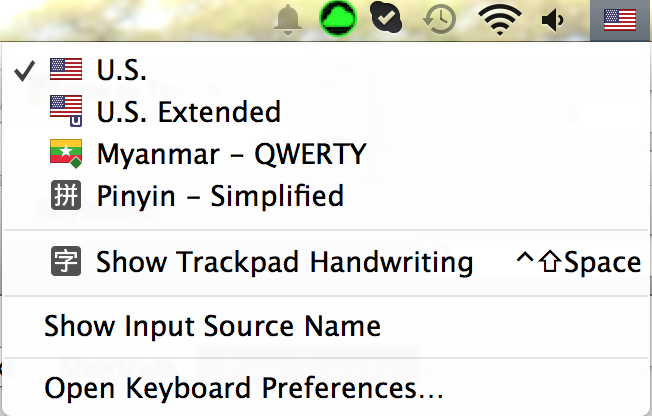
  1. Adding from "System Preferences" > "Keyboard" > "Input Sources" > find "Myanmar - QWERTY"
  2. Make sure to check the "Show Input menu in menu bar" box
  3. When you want to use, choose the Myanmar keyboard from the menu bar
System Preferences
Add keyboard Mac


Choose the keyboard
Choose keyboard Mac


3) Typing complex UNICODE Burmese script (option 1 = simple way) * (thanks to Stephen Spurlock's comment!)
  1. Choose keyboard "Myanmar QWERTY"
  2. To get က္လ [see Image 2.2]: press your keyboard on "k" and then "f" and then "l". 
3) Typing complex UNICODE Burmese script (option 2)
  1. Make sure you have "Unicode Hex Input" keyboard added.
  2. When you want to use it, hold "Option" on your keyboard, and type the number. For example you want to type က (1000) [see Image 2.1]: hold "Option", press "1", "0", "0", "0".
  3. To get stacked consonant:
    (1) type the 'main' consonant, (2) hold " Option", press "1","0","3","9", (3) type the consonant at the bottom.
  4. To get က္လ [see Image 2.2]:
    (1) hold " Option", press 1000, (2) hold " Option", press 1039, (3) hold " Option", press 101C.
  5. You can download the list of unicode from these urls: Unicode U1000, and Myanmar uni v2
Image 2.1
Image 2.2


4) UNICODE Burmese keyboard map on Mac OS X (I map it myself but got the template from Apple Support)


Note:
To get င်္, for example for တနဂင်္နွေနေ့, instead of using SHIFT+z
type တနင် first + press f to get the င် up, then add  = t + n + z + q + f + g
(12 Jun 2018)


Reference:
1. John Okell's "Burmese fonts guide 2016" Using Burmese fonts on a computer
2. Writing with unicode on mac
3. Burmese Keyboard Layout
4. mingalapar forum: how-to-install-myanmar-zawgyi-font-on-mac-os

List of Unicode:
1. http://www.utf8-chartable.de/unicode-utf8-table.pl?start=4096&number=128&utf8=string-literal
2. http://unicode.org/charts/PDF/U1000.pdf
3. http://unicode.org/notes/tn11/myanmar_uni-v2.pdf

Last modified: 05 Dec 2016

KR,

bamalearnburmese@gmail.com • instagram.com/bama_burmese/

July 18, 2014

Reading and Writing Burmese Script on Windows Computers

Halo,

Please note that they are not "font and keyboard", the correct term is "encoding"; though I still use font and keyboard because I think it is easier for me to understand.

Contents:
  1. Preface
  2. Reading Burmese script on Windows.
  3. Writing UNICODE Burmese script on Windows.
  4. Writing Zawgyi Burmese script on Windows.
  5. Burmese keyboard map on Windows  (I map it myself but got the template from Google)

1) Preface
  1. There are 2 well-known Burmese fonts (encodings): Zawgyi and UNICODE. Locals used to use Zawgyi, but more and more people move to UNICODE. It is recommended to use UNICODE.
  2. If a person is writing with UNICODE and your device is installed with Zawgyi, generally, you are unable to read the text (the scripts might be wrong, or some dotted circle appears).
  3. UNICODE has several fonts, such as "Padauk", "Myanmar3" and "Myanmar Census" (recommended).
  4. In most cases, if your friends have documents with "Zawgyi" while you use UNICODE, you still can read it by opening the file, select all text, and change the font to "Zawgyi". See below "Reading Burmese script on Windows."
2) Reading Burmese script on Windows
  1. It is ok to download all the fonts (encoding) (1) UNICODE "Myanmar Census" and other fonts https://github.com/khzaw/awesome-myanmar-unicode(it used to be somewhere here, but it expired i guess); (2) Zawgyi https://code.google.com/archive/p/zawgyi-keyboard/downloads.
  2. after finish download, double click on the .ttf file and click "Install",
  3. open the file on Microsoft Word,
  4. select all words (ctrl+a),
  5. ask the file owner which font he is using, change font respectively: to UNICODE "Myanmar Census" OR "Zawgyi".
You should be able to read it now.


3) Writing UNICODE Burmese script on Windows

(Here is for MAC)
  1. Click the "Language preferences" on right bottom corner,
  2. "Add a language",
  3. Find and click on "Burmese".
  4. When you are going to type with Burmese, click on the "ENG" and choose Burmese; don't forget to choose the UNICODE font on the font options (see above picture on section "2) Reading Burmese script on Windows")
  5. Now you can type မင်္ဂလာပါ => r + i + f + F + : + v + m + y + g 
4) Writing Zawgyi Burmese script on Windows
  1. Go to Google Code zawgyi-keyboard
  2. Download and install the zip file
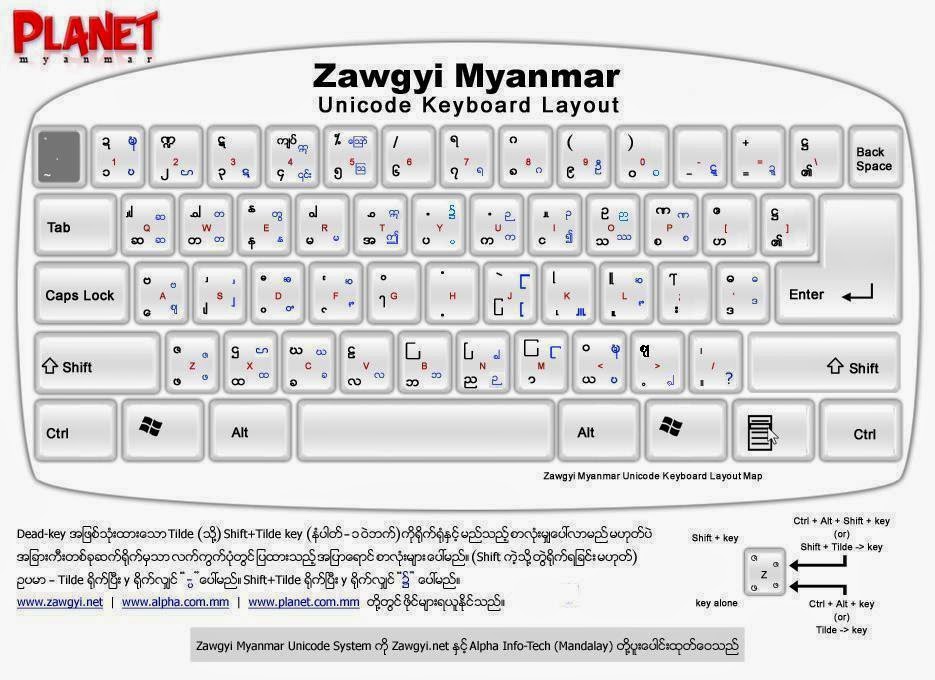
  3. On any box where you want to type your Burmese script (browser, Microsoft Office, etc); press "Shift" and "Ctrl" at the same time to change from normal keyboard to Zawgi (vise in versa)
  4. Find the Keyboard map on the bottom of this post

5a) Windows UNICODE Burmese keyboard map (I map it myself but got the template from Apple Support)


5b) Keyboard option 2: Zawqyi Keyboard LayoutI have tried it, but not very accurate.

Zawgyi_Keyboard_Layout_2009


Last modified: 22 July 2016

KR,